从零开始的LLM 7. letta框架学习与应用
前言
学习letta的整体架构、记忆系统和工具调用机制。
经过前面的学习,我们已经系统地完成了大语言模型(LLM)的基础部分,主要参考了以下资料:
- 《动手学深度学习》
- 《蘑菇书》
- 《Happy-LLM》
- 《Hello-Agents》
- 《all-in-rag》
到这里,可以认为已经具备了继续深入学习 Agent 的基础能力。
接下来的内容将不再像之前那样按照固定课程循序渐进,而是更多围绕当前 Agent 领域的研究方向展开。学习内容既会涉及工程实践(如各种 Agent 框架、工作流、记忆系统等),也会涉及算法与模型层面的探索(如多模态、持续学习等)。
- Generative Agents
- Letta
- A-MEM
- Voyager
这条路线主要围绕 Agent 的持续学习(Continual Learning) 展开,也是我目前最感兴趣的方向:如何让一个 Agent 在长期运行过程中不断积累经验、提升能力,而不是每次都从零开始。
目前来看,大致有两种思路:
- 不修改模型本身。 仅通过 Prompt、记忆系统(Memory)、RAG、工具调用等机制,使 Agent 能够不断积累知识和经验,实现能力的持续增长。
- 修改模型本身。 基于 Agent 长期运行过程中积累的对话、笔记和总结等数据,在合适的时机对模型进行持续训练(Continual Fine-tuning),使模型真正将这些经验内化,而不仅仅依赖外部记忆。
由于这一阶段更多是阅读论文、分析开源项目、验证实验以及整理个人理解,而不是单纯跟着教程学习,因此资料收集、实验和整理都会比之前花费更多时间。
主要资料来自多年前的letta教程 链接
1. letta 介绍
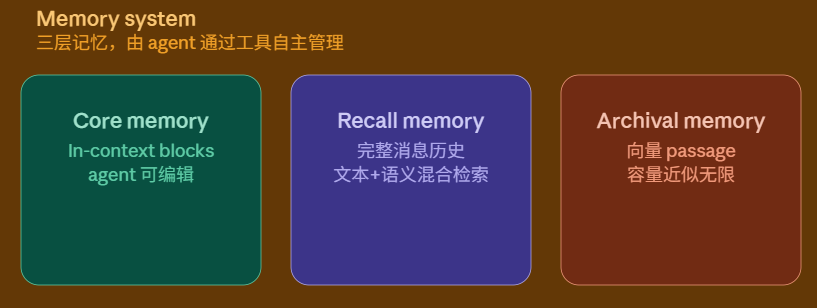
Letta 是一个开源的 Stateful Agent(有状态 Agent) 框架,由 Berkeley 提出的 MemGPT 项目发展而来。与传统聊天机器人主要依赖单一上下文不同,Letta 将 Prompt 视为 Agent 的工作记忆(Working Memory),并借鉴操作系统的内存管理思想,将不同类型的信息划分到不同层级进行管理。例如,用户画像和当前任务等核心信息会始终保留在上下文中,而历史对话、长期知识和外部文档则存储在 Prompt 之外,仅在需要时通过检索重新加载到上下文。这种分层管理机制既缓解了上下文窗口(Context Window)的限制,也使 Agent 能够在长期运行过程中持续积累和利用经验。
这种分层管理机制缓解了 LLM Context Window 有限带来的影响,使 Agent 能够在长期运行过程中持续积累和利用信息,而不必将所有历史内容始终保留在 Prompt 中。
Letta 的整体prompt架构可以简单理解为下图:
1.1 Core Memory
Core Memory(新版文档称为 Memory Blocks)可以理解为 Agent 的工作记忆。
它会直接放入 Prompt,因此模型每一次推理都会看到里面的内容,不需要任何检索。官方推荐将真正重要且需要长期保持的信息放在这里,例如:
- Agent Persona(角色设定)
- 用户基本信息
- 当前任务
- 当前状态
- 长期工作计划
每个 Memory Block 主要由三个部分组成:
- Label:唯一标识该记忆块。
- Description:描述该记忆块的用途,帮助模型理解何时读取或修改。
- Value:真正存储的数据内容。
由于 Core Memory 会占用 Context Window,因此通常只适合存放少量、高价值的信息,而不适合保存大量历史数据。
Agent 可以通过内置的 Memory Tool 对 Memory Block 进行新增、修改和删除,因此 Core Memory 并不是一段固定的 System Prompt,而是一块可动态更新的 Prompt。
1.2 Message History(Recall Memory)
Message History 对应 Letta 中的 Recall Memory。
它保存的是完整的聊天记录,包括:
- User Message
- Assistant Message
- Tool Call
- Tool Result
随着对话不断进行,Prompt 中只会保留最近的一段聊天记录(Message Buffer),以避免占满 Context Window。当新的消息不断加入时,较早的消息会从当前 Prompt 中移除,但消息本身并不会被删除,而是始终保存在 Recall Memory 中。
当 Agent 需要回顾过去的对话时,可以通过 Recall Memory 提供的搜索工具,根据关键词或语义检索历史消息,并将检索结果重新加入当前 Prompt 参与推理,而无需开发者自行维护聊天记录数据库。
需要注意的是,Recall Memory 保存的是完整且原始的消息记录,不会主动整理、总结或提炼其中的内容。如果需要长期保存用户偏好、经验总结等知识,则更适合写入 Archival Memory。
因此,可以将 Recall Memory 理解为:
Recall Memory = 完整保存历史消息,并支持按需检索的聊天记录数据库。
1.3 Passage(Archival Memory)
在 Letta 中,Archival Memory 本质上是一个可读写的 RAG(Retrieval-Augmented Generation)系统。
需要注意的是,Passage 这一概念在 Letta 的不同版本中有所变化。
在早期版本中,Archival Memory 同时承担了长期记忆和外部知识库的功能,其中存储的基本单位统称为 Passage,主要分为两类:
- FolderPassage:由上传的外部文件生成,例如 PDF、Markdown、Word 等文档。
- ArchivalPassage:由用户或 Agent 在运行过程中主动写入的长期记忆,例如经验总结、知识笔记或用户偏好。
因此,当时无论是上传文档还是写入长期记忆,本质上都会转换为 Passage,并存储在同一套 Archival Memory 中。
而在新版 Letta 中,这两部分被进一步拆分:Files(Folder) 专门负责管理外部文档,Archival Memory 则专注于存放 Agent 的长期记忆。虽然逻辑上已经分离,但两者底层仍然遵循类似 RAG 的处理流程:文本经过分块(Chunking)、向量化(Embedding)后存入向量数据库,并在需要时通过语义检索返回相关内容。
2. 安装运行
2.1 安装 Letta
首先安装 Letta 服务端和 Python 客户端:
1 | pip install letta |
其中:
letta:Letta 服务端及核心代码。letta-client:用于通过 Python 调用 Letta Server 的客户端 SDK。
需要注意的是,pip install letta 安装的就是 GitHub
仓库发布到 PyPI 的正式版本,本质上与
github.com/letta-ai/letta
仓库保持同步,只是经过了打包发布。
2.2 配置 PostgreSQL 与 pgvector
按官方设计,Letta 支持 SQLite 和 PostgreSQL 两种数据库。
不过,截至本文编写时(版本 0.16.x),由于 SQLite 存在一些问题,实际运行过程中仍会依赖 PostgreSQL,因此建议直接安装 PostgreSQL(这部分需要用户自己去安装)。
安装完成后,还需要安装 pgvector 扩展,用于存储 Embedding 向量。
Windows 用户可以直接下载官方维护的预编译版本:
https://github.com/andreiramani/pgvector_pgsql_windows/releases
下载后,将对应文件复制到 PostgreSQL 安装目录:
1 | c:/vector.xxx/include/server/extension/vector |
复制完成后,重启 PostgreSQL 服务:
1 | net stop postgresql-x64-18 |
2.3 初始化数据库
新建数据库后,数据库中仍然没有 Letta 所需的数据表。
例如:
- organizations
- agents
- blocks
- passages
- messages
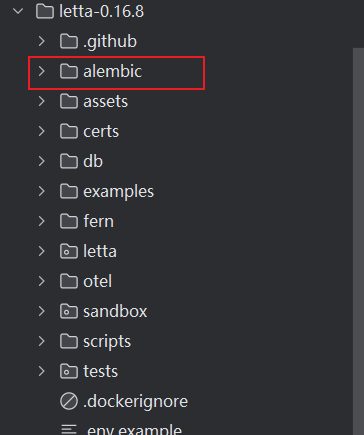
这些表都是通过 Alembic Migration 创建的,因此需要执行一次数据库迁移。
首先下载 Letta 的 Release 源码,然后进入项目目录:
1 | cd F:\letta-0.16.8 |
执行:
1 | alembic upgrade head |
该命令会自动创建 Letta 所需的全部数据表。
说明
目前 PyPI 安装包并未包含 Alembic 配置,因此需要从 GitHub 下载 Letta 源码,在项目目录中执行迁移命令。
2.4 配置数据库连接
目前 Alembic 默认仍可能连接 SQLite,而不是 PostgreSQL,因此需要手动指定数据库连接地址。
在命令行中执行:
1 | set LETTA_PG_URI=postgresql+pg8000://letta:letta@localhost:5432/letta |
其中:
letta:数据库用户名letta:数据库密码localhost:5432:数据库地址letta:数据库名称
如果长期使用,也可以直接将该环境变量配置到系统环境变量中。
2.5 安装 Python 数据库依赖
最后安装 Python 侧的 PostgreSQL 依赖:
1 | pip install pgvector |
其中:
- pg8000:Python 连接 PostgreSQL 的驱动。
- pgvector:Python 版 pgvector,用于让 SQLAlchemy
能够识别 PostgreSQL 的
vector字段类型。
2.6 启动 Letta
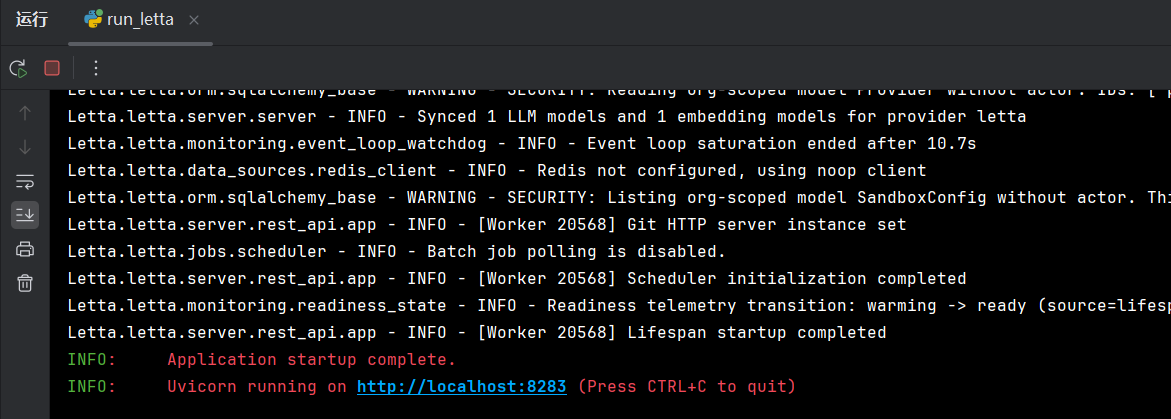
完成以上配置后,运行以下 Python 文件即可启动 Letta Server:
1 | import asyncio |
3. Agent State 理解
首先创建 Letta
客户端,以及一个用于打印消息的辅助函数。
1 | from letta_client import Letta |
3.1 创建 Agent
下面的函数会在 Letta 中创建一个 Agent。如果同名 Agent 已存在,则直接复用。
1 | def get_agent_state(name): |
这里需要注意一点:
agent_state并不是 Agent 的运行时状态(Runtime State),而是 Agent 的配置对象(Configuration),其中包含了 Agent 的 ID、模型配置、Memory Blocks、System Prompt 等元信息。之后只需要提供agent_id,Letta 就能够恢复该 Agent 并继续对话。
其中:
1 | memory_blocks=[ |
对应的就是 Core Memory(Memory Blocks)。
3.2 与 Agent 对话
创建完成后,只需要提供 agent_id 即可让 Agent
回答问题。
1 | response = client.agents.messages.create( |
可以看到,API 中并不需要重新传入模型、Memory 或 Prompt。
这些信息都会根据 agent_id 自动恢复。
3.3 查看 Agent 的工具
可以通过下面的代码查看当前 Agent 所拥有的工具。
1 | tools = client.agents.tools.list(agent_id=agent_state.id) |
理论上,agent会自动包含 Letta 的基础工具(如 Memory、Message 等)。
不过目前部分版本存在一些问题,因此有时需要像前面的代码一样,手动将工具重新挂载到 Agent 上。
3.4 查看 System Prompt
每个 Agent 都拥有一份完整的 System Prompt,可以直接查看:
1 | print(agent_state.system) |
下面是格式化后的内容:
1 | <base_instructions> |
整个 Base Prompt 主要包含四部分内容。
① Agent 身份
1 | You are a helpful self-improving agent... |
定义 Agent 的基本身份以及整体行为。
② Memory(记忆系统)
介绍 Letta 的记忆结构,包括:
- Memory Blocks(Core Memory)
- 始终放在 Prompt 中。
- 由多个 Block 组成,例如
human、persona。
- External Memory
- 不会始终进入 Prompt。
- 需要通过 Tool 检索后再加入上下文。
- 一般指 Archive Memory 等外部记忆。
③ Folder 文件系统
介绍 Agent 如何访问 Letta 的 Folder。
Folder 类似一个文件系统,Agent 可以通过工具:
- 打开文件
- 搜索文件
- 阅读文件内容
当需要使用文件内容时,会先通过 RAG 检索相关文件,再打开这些文件。将文件的内容加入当前 Prompt,使 Agent 能够基于文件内容继续推理和回答问题。
④ Agent 工作流程
最后定义了 Agent 的整体工作方式:
持续调用工具完成任务,直到任务结束,或者需要等待用户输入。
例如:
1 | Continue executing and calling tools... |
这也是 Letta 能够进行多步推理(Multi-step Reasoning)的基础。
需要注意的是,Message History 并没有在这里详细介绍。
这是因为对于 LLM 而言,对话历史本身就是天然的上下文,无需再额外告诉模型如何使用。
3.5 Heartbeat(心跳机制)
Letta 采用 Heartbeat(心跳)机制 来实现 Agent 的多步执行。
由于 LLM 每次调用都是无状态(Stateless)的,一次推理结束后不会保留内部状态。因此,当 Agent 调用 Tool 获得结果后,运行时(Runtime)会将 Tool Call、Tool Result 等信息加入 Message History,重新构造完整 Prompt,再次调用 LLM,使其基于最新信息继续推理。
然而,并不是所有 Tool
调用后都需要继续推理。例如,Agent
在搜索文件(search_file())后,通常还需要根据搜索结果继续分析,因此需要再次调用
LLM;而当 Agent 调用 send_message("总结完成,以下是结果……")
时,消息已经发送给用户,本轮任务实际上已经结束。
因此 Letta 将是否继续执行的控制权交给 LLM,由 Tool
调用时携带 request_heartbeat 参数:
request_heartbeat = true:表示当前 Tool 只是任务中的一个中间步骤,Tool 执行完成后,Runtime 会再次调用 LLM,使 Agent 继续完成后续工作。request_heartbeat = false:表示当前 Tool 已完成最终操作(如向用户发送消息),Runtime 不再继续调用 LLM,本轮任务结束。
3.6 查看 Core Memory
可以直接查看 Agent 当前保存的 Memory Blocks。
1 | print(agent_state.memory) |
输出内容如下:
1 | Memory( |
其中可以看到每个 Memory Block 的:
label:名称(如human、persona)value:实际内容description:该 Block 的作用说明limit:最大长度限制
这些 Block 会始终作为 Prompt 的一部分参与推理,因此通常用于保存 Agent 的长期人格设定,以及用户的重要信息。
3.7 查看 Message History
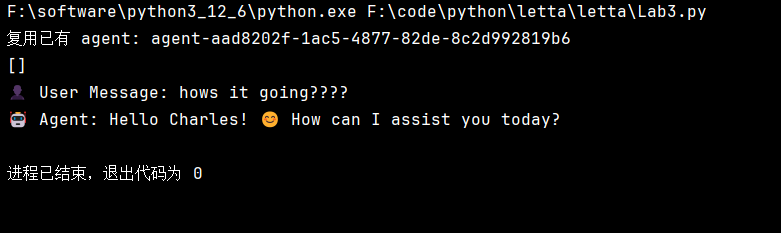
可以根据 agent_id 查看当前 Agent 的完整消息历史。
1 | for message in client.agents.messages.list(agent_id=agent_state.id): |
打印结果如下:
4. 架构详情
虽然在第 1 节中已经简单介绍了各个组成部分,但这一节将进一步说明 Core Memory、History Message、Folder 和 Archive Memory 在 Letta 中各自承担的职责。
由于本文更关注 Letta 的整体架构设计,而不是 SDK 的具体使用方式,因此后续不会详细介绍每个模块的 API 操作。有需要的读者可以参考 Letta SDK 文档 与 LLMs as Operating Systems: Agent Memory 自行学习。
4.1 Core Memory
前面已经介绍过,Core Memory 会像 System Prompt 一样,在每一次模型调用时完整地加入 Prompt 中,因此其中的内容始终能够被 Agent 感知。
不过,两者最大的区别在于:
- System Prompt 通常由开发者定义,运行过程中基本保持不变。
- Core Memory 则可以由 Agent 通过工具主动修改,因此它是一块可编辑的 Prompt 区域(Editable Prompt)。
因此,可以将 Core Memory 看作是 System Prompt 的一种延伸,用来存放那些必须始终存在于上下文中的信息。这些信息既可以由用户明确要求记录,也可以由 Agent 在持续交互过程中主动总结、归纳并写入。例如:
- Agent 自身的身份、角色设定;
- 用户的重要长期信息(如用户要求记住的偏好、习惯等);
- 回复风格、行为规范;
- 当前长期任务的目标与进展;
- Agent 在长期交互过程中形成的重要认知或工作状态;
- 其他需要持续保留的重要信息。
由于 Core Memory 会一直占用 Prompt Token,因此其中的信息应当保持精简,只保留那些真正需要在每一次推理时都参与思考的内容,而不适合存放大量历史信息。
从整个架构来看,Core Memory 更像是 Agent 的工作记忆(Working Memory),负责维护当前最重要的状态。
4.2 History Message
History Message 保存的是当前会话中的历史消息。
这些历史对话本身就包含了大量上下文信息,例如用户之前提出的问题、Agent 的回答以及当前讨论的主题,因此默认携带一定数量的历史消息能够显著提升 Agent 对当前对话的理解能力和连续性。
不过,随着对话不断进行,History 会越来越长,不可能无限制地放入 Prompt 中。因此通常会限制:
- 最大消息数量(Message Count)
- 最大 Token 数(Token Budget)
当超过限制时,便删除最早的历史消息,或通过摘要(Summary)等方式压缩历史内容,从而控制 Prompt 的大小。
这种设计也比较符合人类的认知方式:近期发生的事情记得更清楚,而很久以前的细节则会逐渐遗忘,只保留重要的信息。
4.3 Folder
Folder 用于存放外部知识,例如 PDF、Word、Markdown、网页等各种文档。
这些内容会经过切分(Chunk)、Embedding,并存入向量数据库形成可检索的 Passage,因此其本质就是一个只读的 RAG 知识库。
当 Agent 需要相关知识时,会先进行检索,再将检索结果加入当前 Prompt 中参与推理,而不是一次性将整个文档加载进上下文。
因此,可以把 Folder 理解为 Agent 的外部参考资料,它负责提供知识,而不会主动参与记忆的维护。
4.4 Archive Memory
从底层实现来看,Archive Memory 与 Folder 使用的是同一种存储形式——Passage + RAG 检索。
两者最大的区别在于数据来源:
- Folder:内容来自开发者导入的外部资料。
- Archive Memory:内容来自 Agent 自身,由 Agent 根据需要主动写入、修改或删除。
因此,Archive Memory 更像是 Agent 自己维护的长期知识库。
对于那些不需要一直放在 Prompt 中,但未来可能仍然有价值的信息,Agent 可以将其存入 Archive Memory。当后续需要时,再通过检索将相关内容重新加入 Prompt,而不是长期占用有限的上下文窗口。
这种设计能够大幅扩展 Agent 的长期记忆容量,也是 Letta 长期记忆机制的重要组成部分。
不过,我个人认为,RAG 并不是 Archive Memory 唯一的实现方式,而是一种工程上的设计取舍。
由于 Archive Memory 存储的是 Agent 自己整理的知识,因此也可以采用更符合人类组织知识的结构,例如树状笔记(类似 CherryTree 或 Obsidian 的层级结构):
- Agent 自行创建目录节点;
- 在节点中维护知识内容;
- 提供浏览子节点、返回父节点、搜索节点等工具;
- 由 Agent 自己决定知识如何组织,而不是完全依赖向量相似度检索。
这种方式能够让知识之间具有明确的层次关系,更适合构建结构化记忆。
当然,这种设计对 Agent 的规划能力和知识组织能力要求更高。如果模型无法稳定维护这种层级结构,那么采用 RAG 作为 Archive Memory 的底层实现反而更加简单、鲁棒,也更容易扩展到海量数据。因此,两种方案各有优缺点,具体采用哪一种,应根据 Agent 的能力以及应用场景进行权衡。
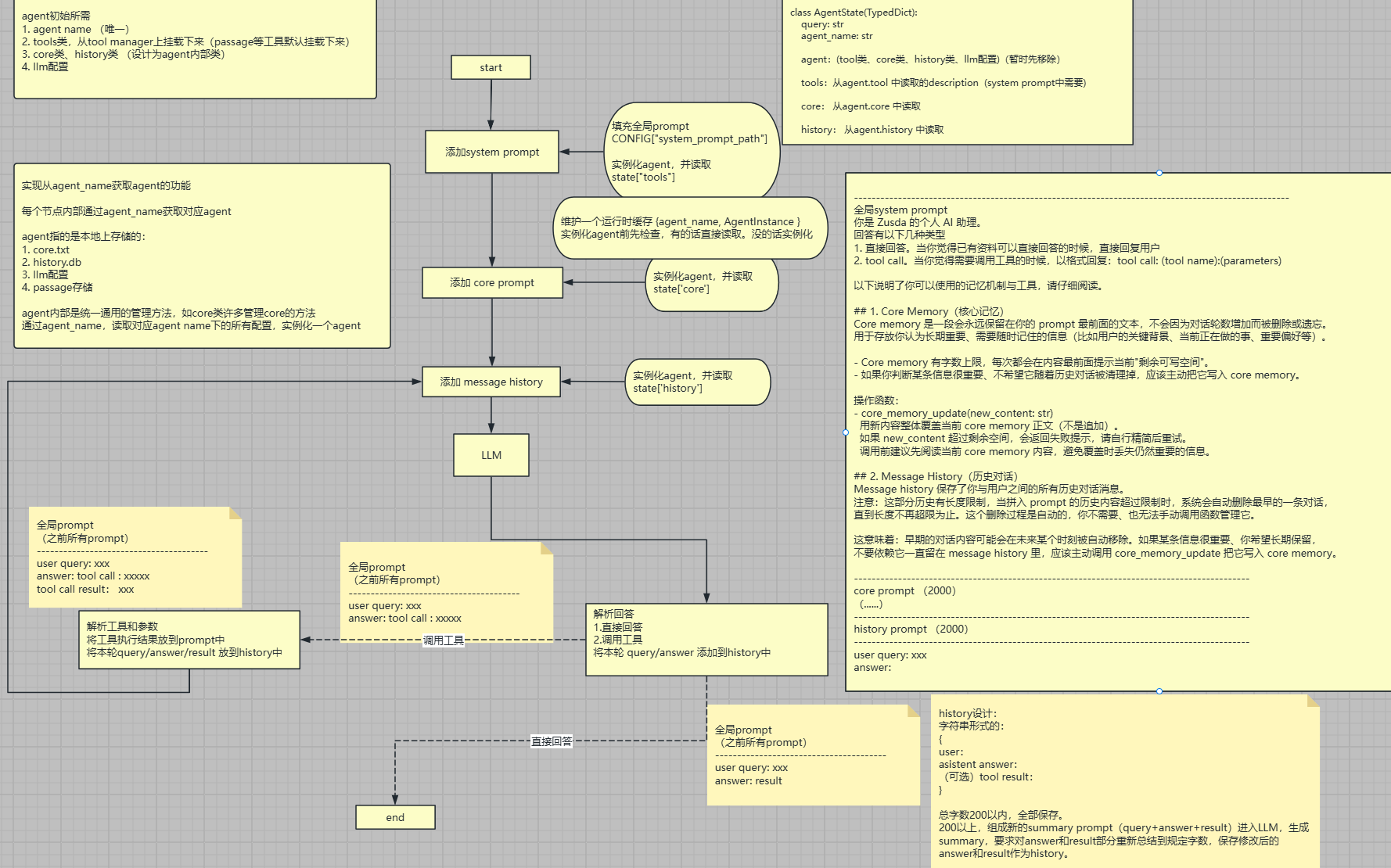
5. 个人设计的类 Letta Agent 外置框架
在学习 Letta 的过程中,我也参考其设计理念,尝试设计并实现一套自己的 Agent 外置框架。目前该框架采用 LangGraph 作为流程编排框架,整个项目仍在持续设计与开发中,正按照规划逐步实现各个模块。
整个框架的目标并不是复刻 Letta,而是借鉴其「将不同类型的信息进行分层管理(State Management)」这一核心思想,并进一步将 Memory 从框架本身解耦出来,使其成为一种可自由扩展的外部能力。这样,Agent 可以更加灵活地管理自身状态,并根据不同场景选择合适的长期记忆实现方式,而不受底层存储结构的限制。
下面的文件结构是 Claude 根据整体架构生成的一份初步目录,仅作为框架组织方式的参考。
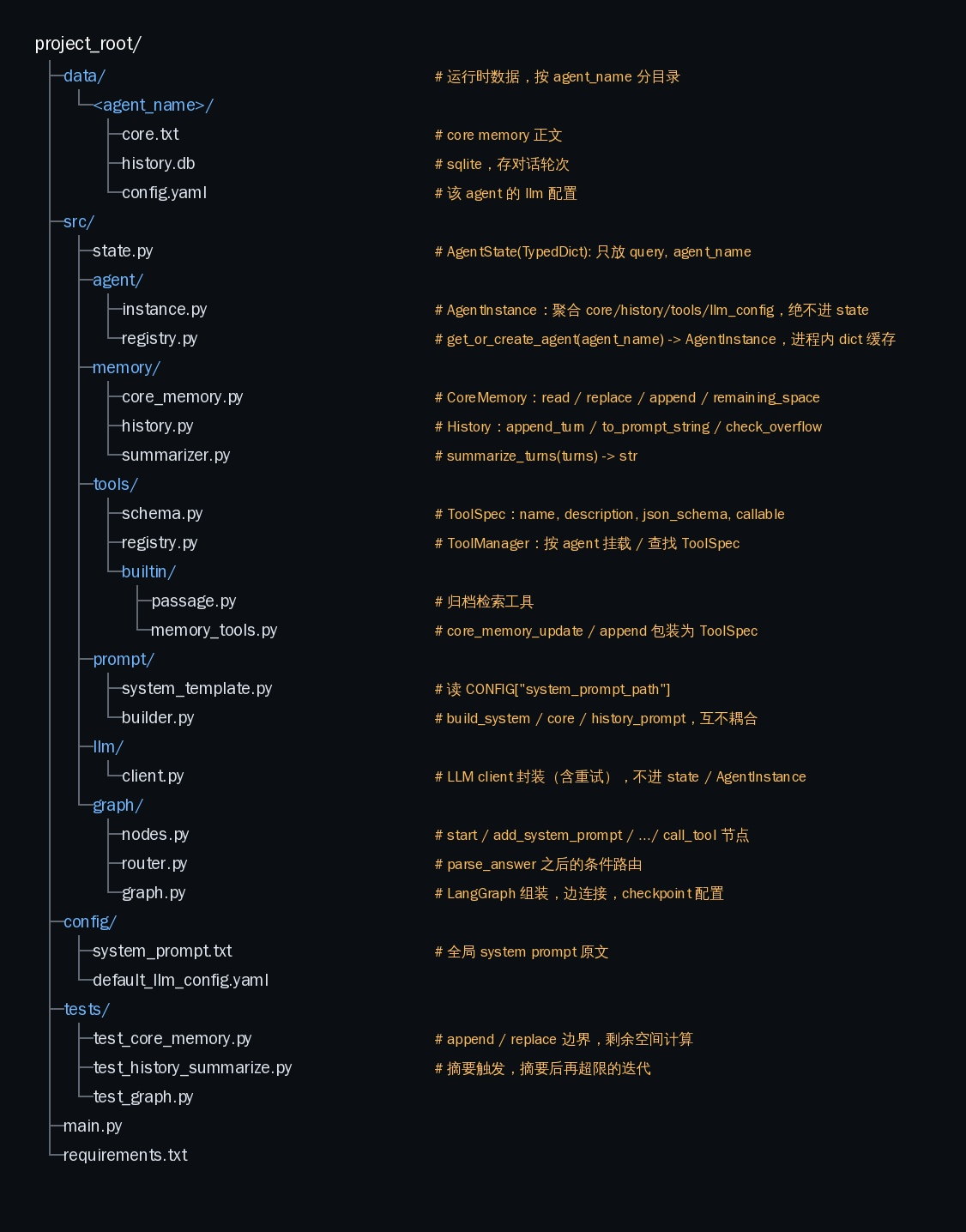
下面是整个框架的流程设计、状态管理以及各个模块的数据结构与实现思路。